

How to add a remote MCP server in Claude Code
To add a remote MCP server in Claude Code, run claude mcp add --transport http pocket-archive https://api.pocketarchive.io/mcp, then run claude mcp login pocket-archive and sign in through your browser. After you approve access, Claude Code can search your archive, read documents and download the original files.
Before you start
A Pocket Archive account. The Free plan works, and agent access is included on every plan.
Claude Code installed and signed in.
A browser on the same computer, for the sign-in step.
At least one document in your archive that has finished processing.
Steps
Open a terminal and add the server:
claude mcp add --transport http pocket-archive https://api.pocketarchive.io/mcpClaude Code confirms it:
Added HTTP MCP server pocket-archive with URL: https://api.pocketarchive.io/mcp to local configBy default the server is added for the current project only. To use it in every project, add
--scope userbefore the name:claude mcp add --transport http --scope user pocket-archive https://api.pocketarchive.io/mcpSign in:
claude mcp login pocket-archiveClaude Code opens Pocket Archive in your browser. You can also run
/mcpinside Claude Code and choose pocket-archive. On a computer without a browser, such as over SSH, runclaude mcp login --no-browser pocket-archivein an interactive terminal (for SSH, connect withssh -t). It prints a link to open in a browser elsewhere. After you approve, copy the full address the browser ends up on (it starts withhttp://localhostand may show an error page) and paste it into the terminal when asked.Sign in if you're asked to. If you're already signed in on the web, you go straight to the approval page.
Check the app name at the top of the page (Connect Claude Code (pocket-archive)?) and the Return to address below the permissions (localhost and a port number).
Claude Code asks for permission to make changes, so Allow changes starts ticked. Untick it for read-only access, or leave it ticked if you want Claude Code to upload, edit or delete. Then select Allow access.
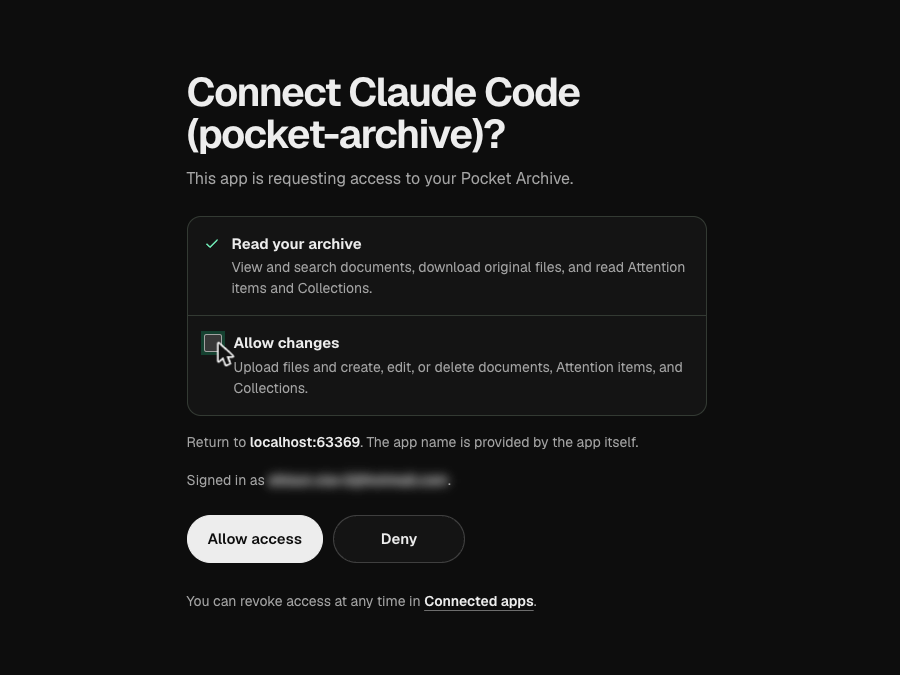
Return to the terminal. Claude Code confirms the sign-in, then stores and refreshes the access for you:
Authenticated with "pocket-archive". Its tools are now available in Claude Code.Check it with
claude mcp list:pocket-archive: https://api.pocketarchive.io/mcp (HTTP) - ✔ ConnectedOptional: install the Pocket Archive skill so Claude Code follows every page of results and waits for processing to finish:
mkdir -p ~/.claude/skills/pocket-archive && curl -fsSL https://www.pocketarchive.io/skills/pocket-archive/SKILL.md -o ~/.claude/skills/pocket-archive/SKILL.md
Check it worked
Ask your agent:
Search my Pocket Archive for my most recent phone bill and tell me the total.
Claude Code calls search_documents, then get_document, and replies with the document title and the total it read. If the tools are missing, run claude mcp list and check that pocket-archive shows ✔ Connected.
What you can ask next
- Find last year's property tax bill and download the original.
- Upload the three receipts in my Downloads folder.
- List every document tagged as a warranty, following all pages of results.
- Remind me to compare quotes a month before my car insurance renews.
- Read my lease page by page and show me the original page that mentions notice periods.
Limits and troubleshooting
Not available to agents: Archive AI chat, spending insights, share links, billing and account settings.
Upload fails: uploads need allow-changes access and an agent that can send the file's bytes. Supported files are PDF, JPEG, PNG and HEIC up to 50 MB. If an upload can't go through, upload on the web.
Tools are missing: a read-only connection doesn't see the tools that upload, edit or delete. Revoke it in Connected apps, then connect again and tick Allow changes.
Access stopped working: access renews every 15 minutes, and each connection ends after 30 days unless you approve it again. If you revoked it,
claude mcp listshows Needs authentication. Runclaude mcp login pocket-archiveand sign in again.Remove fails: if you added the server in more than one scope, Claude Code asks which one. Add
-s localor-s usertoclaude mcp remove.Who reads the text: text Claude Code reads is processed by Anthropic under their terms. Use read-only access for sensitive records.
Questions
Which transport does Pocket Archive use?
Streamable HTTP, with browser sign-in using OAuth with dynamic client registration and PKCE.
Do I need the skill?
No. MCP works on its own. The skill adds guidance that helps agents avoid common mistakes, like stopping at the first page of results.
Can Claude Code upload files from my computer?
Yes, if you allow changes. It can add PDF, JPEG, PNG and HEIC files up to 50 MB, then wait for text recognition to finish.
How do I remove the connection?
Open Connected apps in Pocket Archive settings and select Revoke access. To remove it from Claude Code too, run claude mcp logout pocket-archive, then claude mcp remove pocket-archive. You can reconnect any time.